DreamLabs
DreamLabs
DreamLabs
[Beyond Bolt]
Vibe coding in Bolt proved your idea fast. DreamLabs, a fractional product team, turns it into a tested, secured codebase with its database and hosting in accounts you own, on the web or in the app stores. Start with a two-week strategy sprint for a flat $4,000, refunded in full if we don't move forward together; most builds then take about 6 weeks.
Start with a strategy sprint[What comes next]
Bolt is an impressive piece of engineering. It runs a full Node.js toolchain inside your browser on StackBlitz's WebContainers, so you go from a prompt to a running full-stack app with nothing installed, and it builds mobile apps through Expo. Bolt Cloud now supplies the rest, from a database and sign-in to hosting on bolt.host, plus a security audit in the Publish menu. The code is yours to download or sync to GitHub.
What shifts as the app grows is the economics of prompting. Bolt's docs say most token usage comes from reading, understanding and syncing your project files, so larger projects use more tokens per message, and Bolt's own advice for spending fewer is a smaller project and a cleared context. That is good advice for a prototype. A growing product needs changes that are checked by tests rather than re-prompted, and a database you can roll back: Bolt's version history restores your code, but not your database.
The other shift is who holds the backend. New projects start on Bolt Database, which Bolt runs for you until you claim it into your own Supabase organization. That starts to matter when a customer's security review, a first engineering hire or an App Store release arrives.
If the project is still small, Bolt's security audit comes back clean and nobody outside the team depends on the data yet, keep building in Bolt. Run the audit before every publish, and once your database is in Supabase, work through our free Supabase RLS checklist. If that's the right call, you'll hear it from us in the sprint.
Bolt details on this page were checked against Bolt's documentation on October 7, 2026.
[How it works]
[01]
Two weeks, flat $4,000, refunded in full if we don't move forward together. We map your app into a features table, wireframe what should change, and scope the first production release. Alongside it we go through your repository or export beside the running app: what is implemented versus stubbed, where secrets and validation live, what the dependency tree looks like, how the data model holds up, and everything Bolt Cloud provides today, each paired with its destination. A security pass runs at the same time. You leave with findings, a plan that separates what refactors cleanly from what is faster to rebuild, and the scope we quote the build from.
[02]
Before features, the fundamentals: a proper build and dependency setup outside the browser runtime, environment configuration with secrets on the server, the database in your own account with constraints and versioned migrations, and authorization moved out of the client. Anything urgent from the security pass gets closed here, so the risky things stop being risky early.
[03]
Senior engineers refactor the generated sprawl into shared, typed modules with consistent data access and clear boundaries, using AI to speed up the mechanical work while the structural decisions stay with people. Automated tests and CI/CD land alongside the refactor, which is the point where iteration stops being a gamble: changes get verified by a pipeline instead of by prompting and hoping.
[04]
Your Bolt app keeps running while we build alongside it against the same data, so we can verify parity feature by feature before anything switches. Cutover is a final data sync plus a DNS change, planned so your users don't notice it. Then you get the repository, the infrastructure accounts and documentation an engineer can onboard from, with our team available as an ongoing fractional partner if you want one.
[Where you land]
You land where you already were, done properly. For a React app, that means React with TypeScript, on Vite or moved to Next.js when server rendering or SEO earns it, over Postgres through Supabase or Neon in your own account, with pinned dependencies, a reproducible build and CI/CD. Hosting runs on Vercel, Cloudflare, Netlify or your own cloud, with environments and rollback. If Bolt built you an Expo app, it becomes production React Native; if the roadmap is heavily native, we'll make the honest case for Flutter during the sprint.
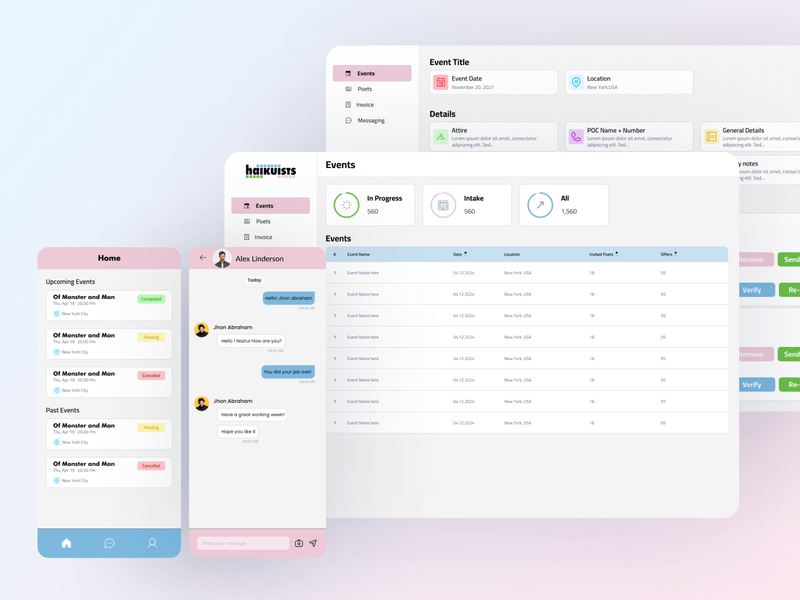
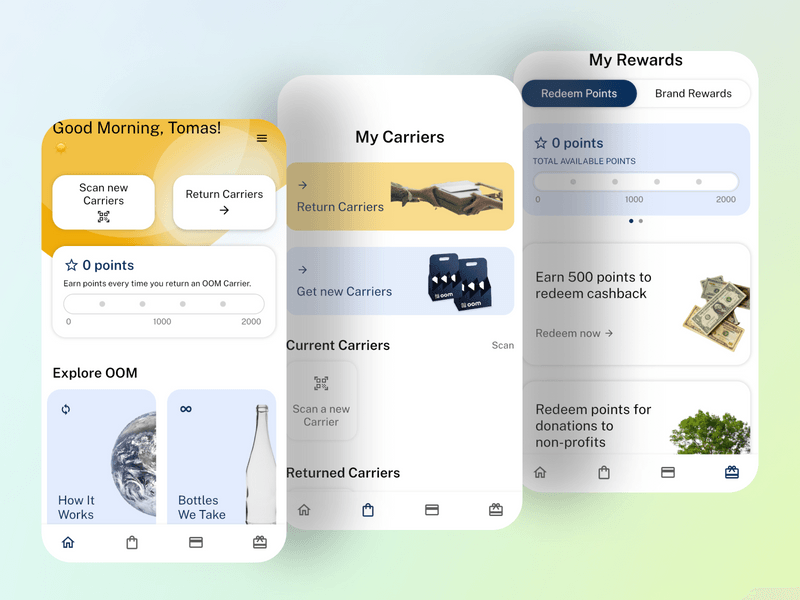
How we ship: Haikuists runs on two products we built over one shared backend, a native mobile app for its contract poets and a desktop web app for its admins, and the first version of both shipped in eight weeks. OOM, an app whose shoppers, partner stores and in-house team all work from the same record, took three weeks of development and launched on the App Store and Google Play. Both are Flutter builds rather than Bolt migrations; they show the engineering a Bolt app grows into.
The economics change too: iteration stops costing tokens per attempt against an app the model can't fully see, and starts costing engineering time against a codebase covered by tests.
[Other platforms]
[Smaller engagements]
Migrating off FlutterFlow, Bubble, Webflow, or Airtable instead? See no-code migration →
[FAQs]
Because a downloadable project and a maintainable application are different things. What you download is real code, but it can lack tests, manage dependencies loosely, keep validation and secrets in the wrong places, and follow a structure shaped by a series of prompts rather than a design, and its database still lives in Bolt until you claim it. The migration turns it into something a team can extend safely: hardened, typed, tested, and deployed through a pipeline you control.
Bolt's docs explain part of it: most token usage comes from reading and syncing your project files, so larger projects use more tokens per message, and Bolt advises keeping its context small. Each prompt becomes a local edit made without a picture of the whole system, which is how fixing one thing breaks two, and with no tests the breakage shows up later, in production. Better prompting helps at the margin; architecture and a test suite fix it.
Run Bolt's audit; it's in the Publish menu on paid plans and doesn't use tokens. It checks who can see and change data, sign-in, misuse such as changing a price, the input your app accepts, and where keys live, then fixes what it can. It is an automated pass over the project as it stands. A production review adds what an automated pass can't: a written permission model for your product, a reproduction for each finding, tests that prove every rule holds, and a check that the deployed configuration matches the code.
It moves into an account you own. Bolt documents claiming a Bolt Database into your own Supabase organization on Pro and Teams plans, which keeps your data; connecting a different Supabase project instead can replace it, so we never start there. Once the database is yours, it gets a reviewed schema, versioned migrations, tested policies and backups, which matters because Bolt's version history restores code but not data.
It maps cleanly onto a production React Native build. The screens and product decisions carry over, the backend moves into your accounts, and what gets built is what was never there: navigation and state architecture, native permissions, typed models, tests, and a release pipeline with signing credentials you own. Our App Store guide covers store review.
Every migration starts with a two-week strategy sprint for a flat $4,000: we map your current app into a features table, wireframe what changes and scope the first release, and we refund the sprint in full if we don't move forward together. We quote the build from that scope. Most builds take about 6 weeks, at a fraction of the cost of a traditional agency rebuild of the same product, which typically takes 6 months, because your Bolt app is a complete, running specification. If the sprint finds the build only needs hardening, the scope is smaller.
[Interested?]